You now have the pieces of a complete game. The final model function, step, wires them together in one explicit order. The desktop adapter wraps that pure update with input, a clock and a renderer.
The finished lab is a playable catch-the-ball game. Use arrows or A/D to move, P to pause or resume, R to restart and Esc or the window close button to quit. The blue paddle catches the amber ball. Three misses end the round. Everything needed for shapes, fonts, tests and replay fixtures is included or declared as a pinned dependency.
First apply commands. Return immediately if this is a command frame or the resulting state is not running. This also makes resume and restart frames motionless even though their result can be running. On an ordinary frame, advance positions and resolve the fall using both the pre-motion and moved values.
The pure function never imports Pygame. Its tests cover command priority, a catch-plane boundary, a complete missed round and replay equality. A fixed fixture is not proof of every possible game sequence; it is reproducible evidence for the stated contracts.
def decide_frame(command, mode):
    if command or mode != "running":
        return ["apply commands", "return"]
    return ["apply commands", "advance motion", "resolve fall"]
for command, mode in [(False,"running"),(True,"running"),(False,"paused")]:
    print(decide_frame(command, mode))
Download and unzip the lab, create a virtual environment, install requirements.txt, run the headless tests, then launch play.py. The archive contains model.py, starter.py, the desktop adapter, model and adapter tests, replay fixtures, diagrams and a README. To practice locally, choose the unfinished model through --model starter; to inspect the working artifact, use the default model.
The adapter drains event.get once per frame, samples held directions, gets elapsed milliseconds from Clock.tick(60), calls step, interprets render_plan and flips the display. A finally block releases Pygame resources. The target of 60 frames is a cap, not an exact timing promise.
The gameplay clip below is an actual scripted replay through the shipped model and renderer. Its controller supplies semantic controls rather than real keyboard presses; the desktop game accepts both paths. All visuals are original generated shapes.
from dataclasses import dataclass, replace
@dataclass(frozen=True)
class Round:
    score: int = 0
    misses: int = 0
state = Round()
for event in ["catch", "catch", "miss"]:
    state = replace(state, score=state.score + (event == "catch"), misses=state.misses + (event == "miss"))
print(state)
print("resolved", state.score + state.misses)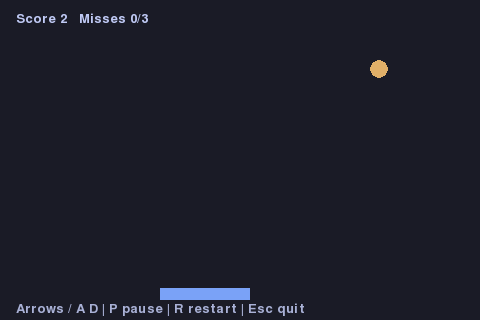
Watch the short MP4 replay. Both use the shipped renderer with scripted controls. The lab README documents how to regenerate frames.
Before calling your version finished, run the model tests without Pygame, run the adapter smoke test after installing the desktop dependency, play a round, deliberately miss, pause, restart and close the window. Extend it by adding a second ball only after deciding how multiple outcomes affect the turn invariant. See the included review checklist for concrete completion evidence.
Download the complete lab. The archive includes runnable code, tests, fixtures and a README.