
A game does not need a window to have rules. Its model answers questions such as “where is the ball?” and “has the player used every life?” Keep those answers in ordinary Python values. The desktop adapter will read them later.
This course follows classes and composition. You should already be able to write functions and work with collections. We supply frozen dataclasses for Config, Paddle, Ball, World and Controls. Frozen means attribute assignment is rejected; our fields contain immutable values too. For a transition, use dataclasses.replace to construct a new value.
The finished artifact is a catch-the-ball game. Move the paddle, catch a descending ball, miss three times to end the round, and restart. Hosted exercises require no graphics package; the downloadable desktop lab adds pygame-ce.
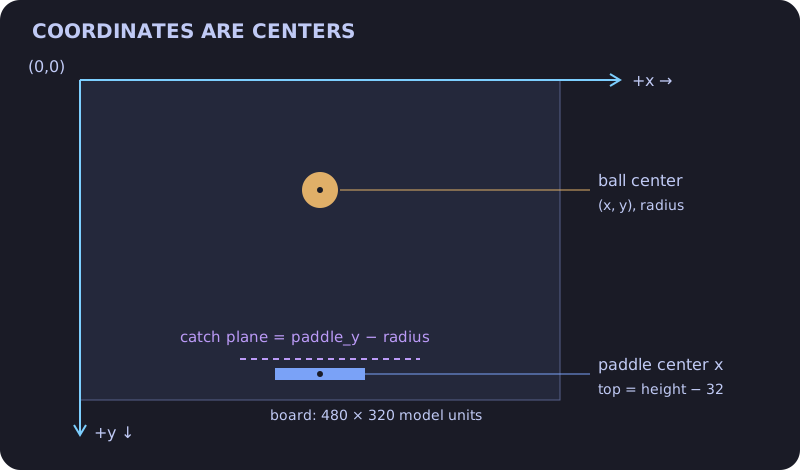
The coordinate origin is the board’s top-left corner. x increases to the right; y increases downward. A 480 × 320 display has pixel indices through 479 and 319, but the model uses continuous coordinates at its edges. We store centers: a radius-nine ball starts at y=9, and a width-90 paddle must keep its center between 45 and 435.
The next snippet computes those bounds without importing Pygame.
width, paddle_width, radius = 480, 90, 9
half = paddle_width / 2
print("center", width / 2)
print("paddle bounds", half, width - half)
print("ball center bounds", radius, width - radius)
Config validates supported board sizes, speeds and a nonempty deterministic spawn sequence. A spawn fraction of zero places the ball center at the left radius; one places it at width − radius. This is an explicit teaching policy. It helps us replay a game and write repeatable checks without random seeds.
new_game creates fresh composed objects and starts score, misses and turn at zero. The important counter invariant is turn == score + misses: every resolved ball contributes exactly one outcome. A newly opened window, a pause and a redraw must not increment any of those counters.
from dataclasses import dataclass, replace
@dataclass(frozen=True)
class Score:
    caught: int = 0
    missed: int = 0
old = Score()
new = replace(old, caught=old.caught + 1)
print(old)
print(new)
print("resolved", new.caught + new.missed)
Implement only new_game in the practice exercise. The supplied support code is part of the contract, not something you must rewrite. Check a custom board and an odd width as well as the defaults.
Later lessons connect this value to input, motion and a renderer. Download the desktop lab when you are ready to see the shapes move.